
Assigning Administrators and choosing extra permissions for agents
2 minute read
What extra permissions can I give to an agent?
With LiveHelpNow you have full control over the content each operator is able to view and manage. The following ‘Extra Permissions’ are found in Admin panel -> System Setup -> Agents (select agent profile)
- You can make any agent an Administrator with full access to your system settings.
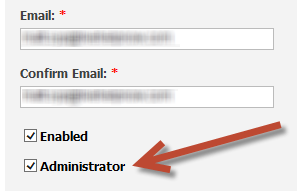
- Keep "Administrator" and all "Extra Permissions" unchecked to only allow this operator to access the Agent workspace.
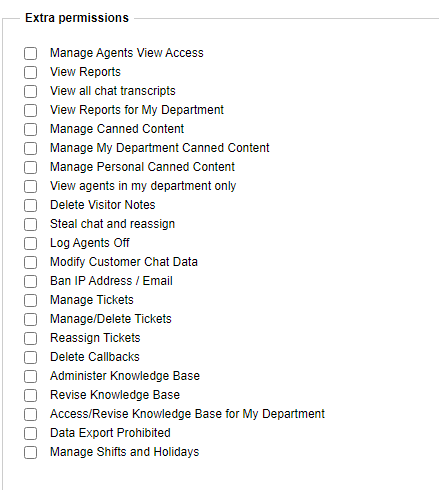
- Extra Permissions:
- "Manage Agents View Access" allows the agent to manage the view access of other agents.
- "View Reports" allows the agent to access the Analytics system and view all LiveHelpNow reports.
- "View all chat transcripts" allows the agent to view the entire accounts' chat transcripts.
- "View Reports for My Department" allows the agent to view reporting for the departments they are part of.
- "Manage Canned Content" allows the agent to create and edit canned messages and links.
- "Manage My Department Canned Content" allows the agent to create and edit canned messages and links for the departments they are part of.
- "Manage Personal Canned Content" allows the agent to edit their personal canned messages and links.
- "View agents in My Department Only" allows the agent to view only agents within their department when transferring chats and tickets.
- "Delete Visitor Notes" allows the agent to delete the notes agents leave on individual chats.
- "Steal chat and reassign" allows the agent to take over chats from other agents and reassign them.
- "Log Agents Off" allows the agent to log other agents off.
- "Modify Customer Chat Data" allows the agent to modify the customer details within the request info section while in chat.
- "Ban IP Address/Email" allows the agent to ban chats and emails that are deemed spam.
- "Manage Tickets" allows the agent to reassign tickets to other agents or "steal" a ticket.
- "Manage/Delete Tickets" allows the agent to "Manage Tickets" and delete tickets.
- "Reassign Tickets" allows the agent to reassign tickets.
- "Delete Callbacks" allows the agent to delete callbacks.
- "Administer Knowledge Base" allows the agent to "Revise Knowledge Base" and delete articles.
- "Revise Knowledge Base" allows the agent to create articles and edit existing articles.
- "Access/Revise Knowledge Base for My Department" allows the agent to view and edit Knowledge Base articles for the departments they are part of.
- "Data Export Prohibited" Does not allow the agent to export analytical and Knowledge Base data from the system.
- "Manage Shifts and Holidays" allows the agent to configure shift and holidays within "WorkForce Management".