
New visitor notification
1 minute read
New visitor notification sometimes is very late or not shows at all, why is that?
New visitor notification may be set in the Windows App settings and it is designed to alert agents of new visitor arrival.
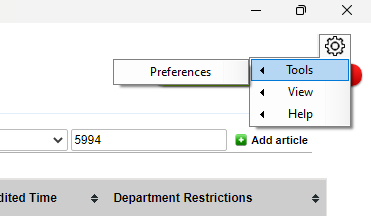
To configure the new visitor notification setting, click the gear icon at the top right hand side of the workspace and select "tools" then "Preferences".
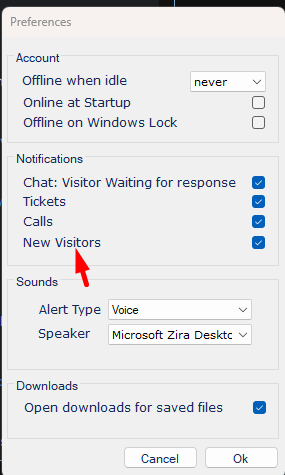
Then select the new visitors checkbox.
New visitor notification will only show if the following is true:
- The Agent Workspace must be closed or minimized. If operator panel is open, the Alerter will assume that the operator is aware of all the activity on the site and does not need to be alerted.
- New visitor notification will only show for a visitor who has not visited your site in the last 24 hours. If you are testing please ask a friend using a different network to visit your site.